GTA 6 Download Time: How Long Will It Take? Calculator and Preload Tips (2026)
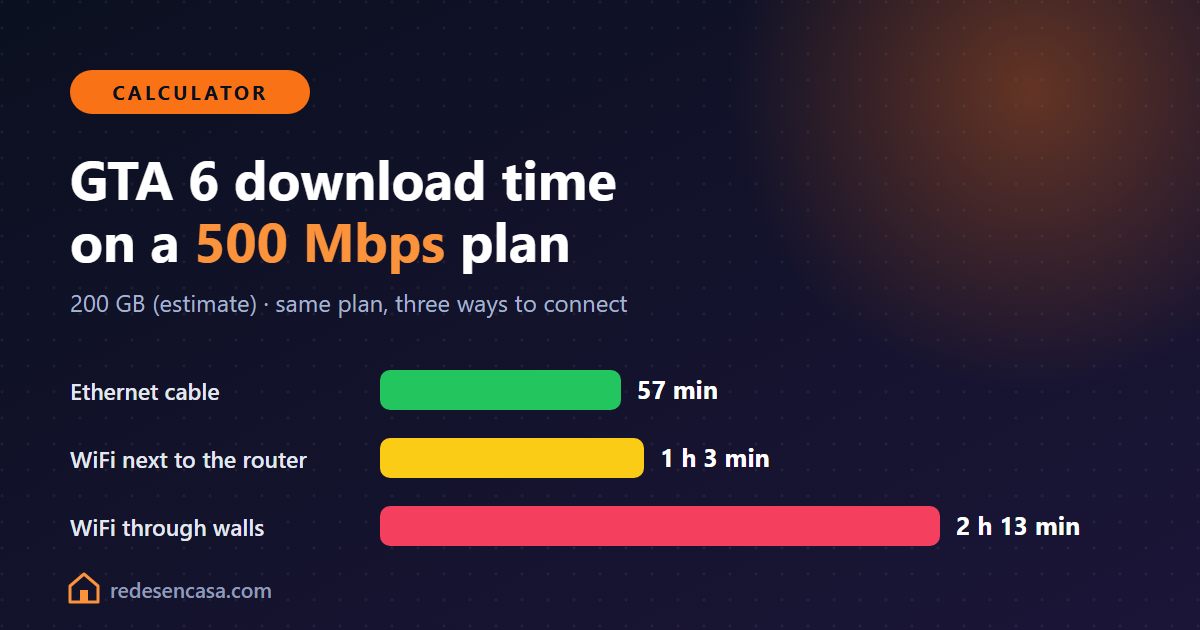
GTA 6 download time depends far more on how your console is connected than on what you pay your internet provider. On a 500 Mbps plan with the console wired to the router, the 212 GB download takes about an hour. On the same plan over WiFi through a couple of walls, it takes more than two. And on a 100 Mbps plan over WiFi, it can eat the whole night.
Rockstar says the preload requires up to 212 GB, so the calculator below uses that figure plus your real connection. Try it before November 10, when the preload opens, and you’ll have time to fix whatever is slowing you down.
Tabla de Contenidos
GTA 6 download time calculator
Pick your plan and how the console is connected. The calculator doesn’t use the speed on your bill, but the speed that usually reaches a console over each type of connection: about 93% of your plan over Ethernet, and half or less over WiFi through walls.
Calculator: how long will GTA 6 take to download on your connection?
Pick your internet plan and how your console is connected. It works for any other game too.
Estimated time
–
Real speed reaching the console
– Mbps
Over Ethernet it would take
–
How this is calculated
If you get hours over WiFi and minutes over Ethernet, you don’t need a faster plan. You need to get the connection to the console, and below you’ll find ways to do it without drilling a single hole.
How big is GTA 6? What we know and what we don’t
Rockstar has now confirmed it: the preload requires up to 212 GB, depending on the console. It said so in its November 3 announcement, so there’s no need to rely on estimates anymore. A launch-day update may add to that, but its size isn’t known yet.
The calculator already uses that 212 GB figure. The exact size for your console will appear on the PlayStation Store or the Microsoft Store when the preload opens.
For context: the big open-world games of the last few years take up between 100 and 150 GB, so GTA 6 lands well above that.
GTA 6 download time by internet plan
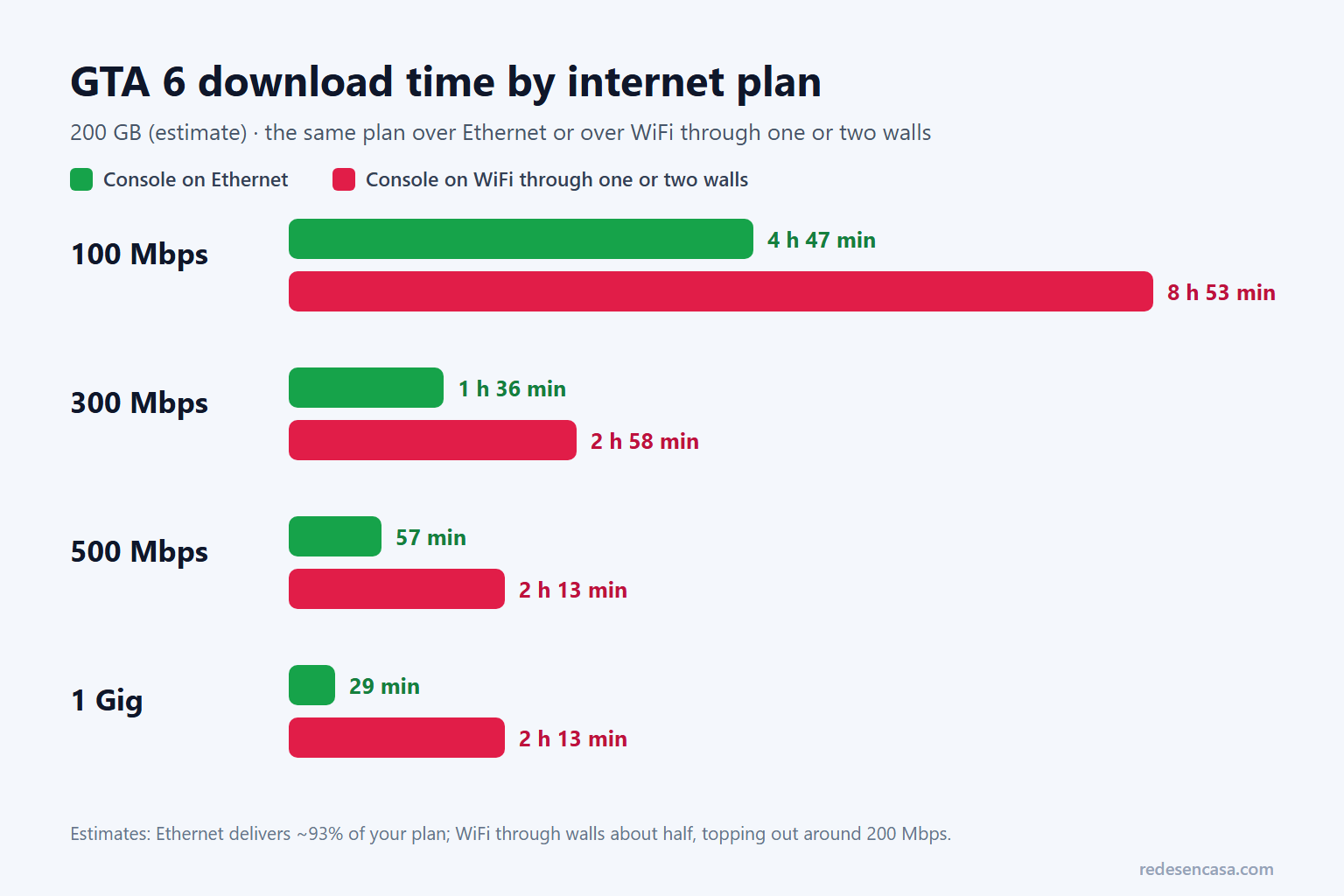
These are the GTA 6 download time figures for 212 GB, the maximum Rockstar gives, on the most common US internet plans. They use the same model as the calculator. The images in this guide were made with 200 GB: at 212 GB, add about 6%.
| Plan | Ethernet | PS5 on WiFi, next to the router | Xbox on WiFi, next to the router | WiFi through walls |
|---|---|---|---|---|
| 100 Mbps | 5 h 4 min | 5 h 33 min | 5 h 53 min | 9 h 25 min |
| 300 Mbps | 1 h 41 min | 1 h 51 min | 1 h 58 min | 3 h 8 min |
| 500 Mbps | 1 h 1 min | 1 h 7 min | 1 h 21 min | 2 h 21 min |
| 1 Gig | 30 min | 47 min | 1 h 21 min | 2 h 21 min |
| 2 Gig | 30 min | 47 min | 1 h 21 min | 2 h 21 min |
Look at the last column: from 500 Mbps up, the time over WiFi through walls doesn’t change. When the signal reaches the console weak, your home network is the bottleneck, not your plan. Paying for more speed won’t cut a single minute if the console is two rooms away.
Two more details the table shows. The PS5 has WiFi 6 and the Xbox Series X|S has WiFi 5, so next to the router the Xbox gets less out of a fast plan. And both consoles have a Gigabit Ethernet port, so a 2 Gig plan tops out at about 940 Mbps on the console: it downloads barely faster than 1 Gig.
The GTA 6 preload starts November 10: what to do
GTA 6 launches on November 19, 2026 on PS5 and Xbox Series X|S. Rockstar has confirmed that the digital preload starts on November 10: at midnight local time on PS5, and at 12 a.m. GMT on Xbox, which in the US is the evening of November 9 (7 p.m. Eastern). Code-in-box copies reach stores from November 12. The game downloads ahead of time and stays locked until launch day.
That changes the question: it’s not so much about GTA 6 download time as about when you start. With nine days of margin, even a slow connection gets there in time if the download starts on day one and the console doesn’t sit idle.
- Pre-order the digital version if you want to preload: the preload is only for digital pre-orders.
- Leave the console in rest mode with the download running. On PS5, go to Settings → System → Power Saving → Features Available in Rest Mode and turn on Stay Connected to the Internet. On Xbox, go to Settings → General → Power options and choose Sleep.
- Free up space first, not halfway through the download (more on that below).
- If you’re buying the disc, plan for the install time and a day-one patch too: that’s normal for big launches.
A warning: on the first night of the preload, millions of consoles will be downloading at the same time. PlayStation and Xbox servers handle a lot, but those first hours are often slower than any calculator says. If you can wait until the next day, the download usually runs smoother.
Check your data cap before you download
This one is very American. Some US internet providers, Xfinity and Cox among them, have long applied a monthly data cap of around 1.2 TB on many plans. It depends on your provider, your plan and your area, and some newer plans include unlimited data.
If yours has a cap, the GTA 6 download plus its day-one patch could use around a fifth of your monthly allowance, on top of streaming and every other game update. Check your usage in your provider’s app before November 10, and avoid downloading the game twice (for example, deleting it and redownloading it to free up space).
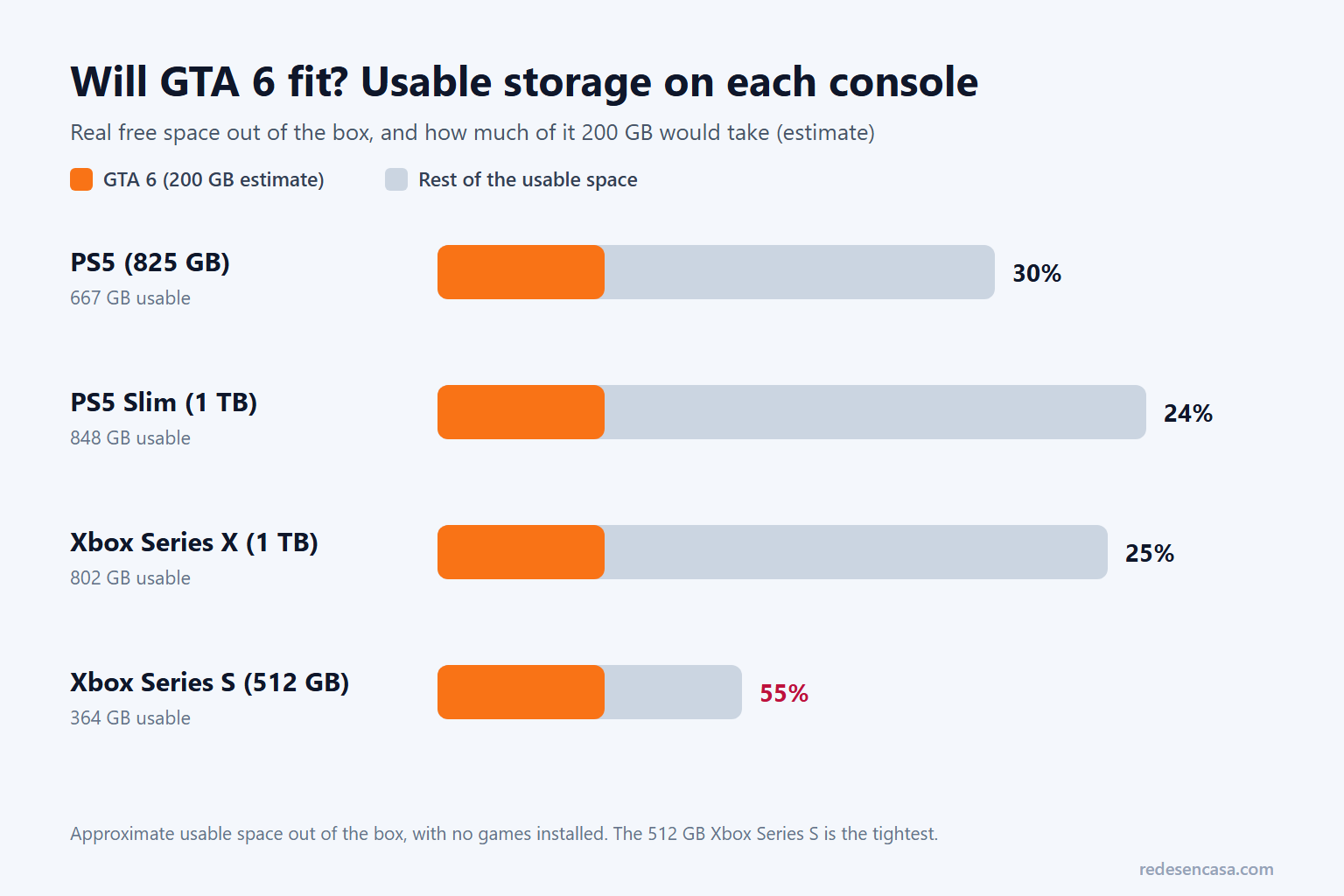
Will it fit? Free space on PS5 and Xbox Series
Before you worry about GTA 6 download time, check your storage. Consoles never have their advertised capacity free: part of the drive is reserved for the system.
| Console | Approximate usable space | Share 212 GB would take |
|---|---|---|
| PS5 original (825 GB) | 667 GB | 32% |
| PS5 Slim (1 TB) | 848 GB | 25% |
| Xbox Series X (1 TB) | 802 GB | 26% |
| Xbox Series S (512 GB) | 364 GB | 58% |
The tightest one is the 512 GB Xbox Series S: GTA 6 can take more than half of its free space. PS5 and Xbox Series games can be stored on a USB drive, but to play them they have to be on the internal SSD or on a compatible expansion drive.
If you’re short on space, the Xbox takes an expansion card that plugs into the back, and the PS5 takes an M.2 SSD with a heatsink in its internal slot. SSD prices are up this year, so before buying anything, check which games you can delete.
5 settings that make the download faster
These settings change GTA 6 download time more than any plan upgrade:
- Connect the console with an Ethernet cable. It’s by far what shortens the download the most. The table above shows it: on 500 Mbps it goes from more than two hours to under one.
- Don’t play online while it downloads. Consoles usually lower the priority of downloads while you play, and online games compete for the same connection.
- Pause the rest of the house for a while. A 4K stream, a video call or a phone backing up to the cloud all take bandwidth from the download. If you start it at night, this fixes itself.
- If it gets stuck, pause it and resume it. Sometimes the console latches onto a busy server, and resuming connects it to another one.
- Don’t waste time changing DNS. Changing DNS rarely speeds up a download. What limits it is the real speed reaching the console, not name resolution.
If you also play online, ping is a different story from download speed. You’ll find it in how to fix lag on WiFi, and if you get a strict NAT, in how to fix a strict NAT type and how to open ports on your router.
Ethernet, powerline or WiFi: the difference in hours
The best way to cut GTA 6 download time isn’t a new router or a faster plan: it’s getting a good connection to the console. There are three ways, from cheapest to least cheap.
Ethernet cable: the option that saves the most time
If the console is within 30 to 50 feet of the router, a flat Cat 6 cable slides under a door or along the baseboard and fixes the problem for good. It’s the cheapest and fastest option.
Powerline: when you can’t run a cable
A powerline kit carries the connection through your home’s electrical wiring: one adapter next to the router and another next to the console. In a typical home it delivers 200 to 400 Mbps of real speed, which for this download is far better than WiFi through walls. We compare the best models in our guide to the best powerline adapters.
WiFi: if there’s no other way
If you’re downloading over WiFi, move the console closer to the router that night, or at least leave the doors open. With a PS5 and a WiFi 6 router in the same room, the difference from Ethernet is only a few minutes. If your WiFi is weak all over the house, a mesh WiFi system or a good WiFi extender helps every device, not just the console.
If the download is slower than the calculator says
If the console is downloading way below what you got above, go through this before blaming anyone:
- Run a speed test on the console and compare it with one on your phone next to the router. On PS5 it’s in Settings → Network → Connection Status → Test Internet Connection; on Xbox, in Settings → General → Network settings → Test network speed & statistics. If it’s fast next to the router but slow on the console, the problem is the signal reaching the console.
- Check the time. On the first night of the preload and on launch day, the slowdown may come from the servers. Check the PlayStation Network or Xbox status page and try again the next day before changing anything.
- Restart the router and the console if they’ve been on for weeks.
If the Xbox won’t connect at all, see what to do when your Xbox won’t connect to WiFi. And if it downloads, but much slower than it should, here are 10 fixes for a PS5 slow download.
GTA 6 download time FAQ
How long will GTA 6 take to download on 500 Mbps?
On a 500 Mbps plan with the console on Ethernet, about 1 h 1 min with the 212 GB Rockstar gives. Over WiFi next to the router, about 1 h 7 min on a PS5. Over WiFi through walls, 2 h 21 min. The exact size can vary by console.
How big is GTA 6?
Rockstar says the preload requires up to 212 GB, depending on the console. The exact size will show up on the PlayStation Store and the Microsoft Store when the preload opens on November 10.
When can I preload GTA 6?
The digital preload starts on November 10, 2026: at midnight local time on PS5 and at 12 a.m. GMT on Xbox. The game launches on November 19 and stays locked until that day, even if it’s already downloaded.
Is GTA 6 faster to download over Ethernet than WiFi?
Yes, and the difference can be hours. Over Ethernet you get almost all of your plan’s speed; over WiFi through walls, half or less, with a practical ceiling of about 200 Mbps. On a fast plan, Ethernet can take under an hour and WiFi more than two.
Will GTA 6 fit on the Xbox Series S?
On the 512 GB Xbox Series S, with about 364 GB of usable space, it fits, but it can take more than half of the free space at the 212 GB Rockstar gives. Free up space before the preload or add an expansion card.
Conclusion
GTA 6 download time depends much less on your internet plan than it seems: on any plan of 300 Mbps or more, Ethernet gets it done in under two hours. What stretches the download into the middle of the night is WiFi through walls. Try the calculator now, free up space, check your data cap and, if you get hours, run a cable or set up a powerline kit before November 10.