PS5 Slow Download: Why It Happens and 10 Fixes That Actually Work (Xbox Too)
Got a PS5 slow download and a game that takes hours even though you pay for a 500 Mbps plan? It’s one of the most common console problems, and it’s almost never your plan’s fault: the speed usually gets lost between the router and the console, or Sony’s and Microsoft’s servers are overloaded. Everything here works on Xbox Series X|S too.
Here’s how to find where the problem is in two minutes, the 10 fixes that actually work (and two «tricks» that don’t), how long a game should take on your connection, and what to do before the GTA 6 preload on November 10.
Tabla de Contenidos
First, find where the problem is
Before you try to fix a PS5 slow download (or an Xbox one), run two speed tests back to back: one on the console and one on your phone, standing next to the router. Comparing them tells you where the speed is getting lost:
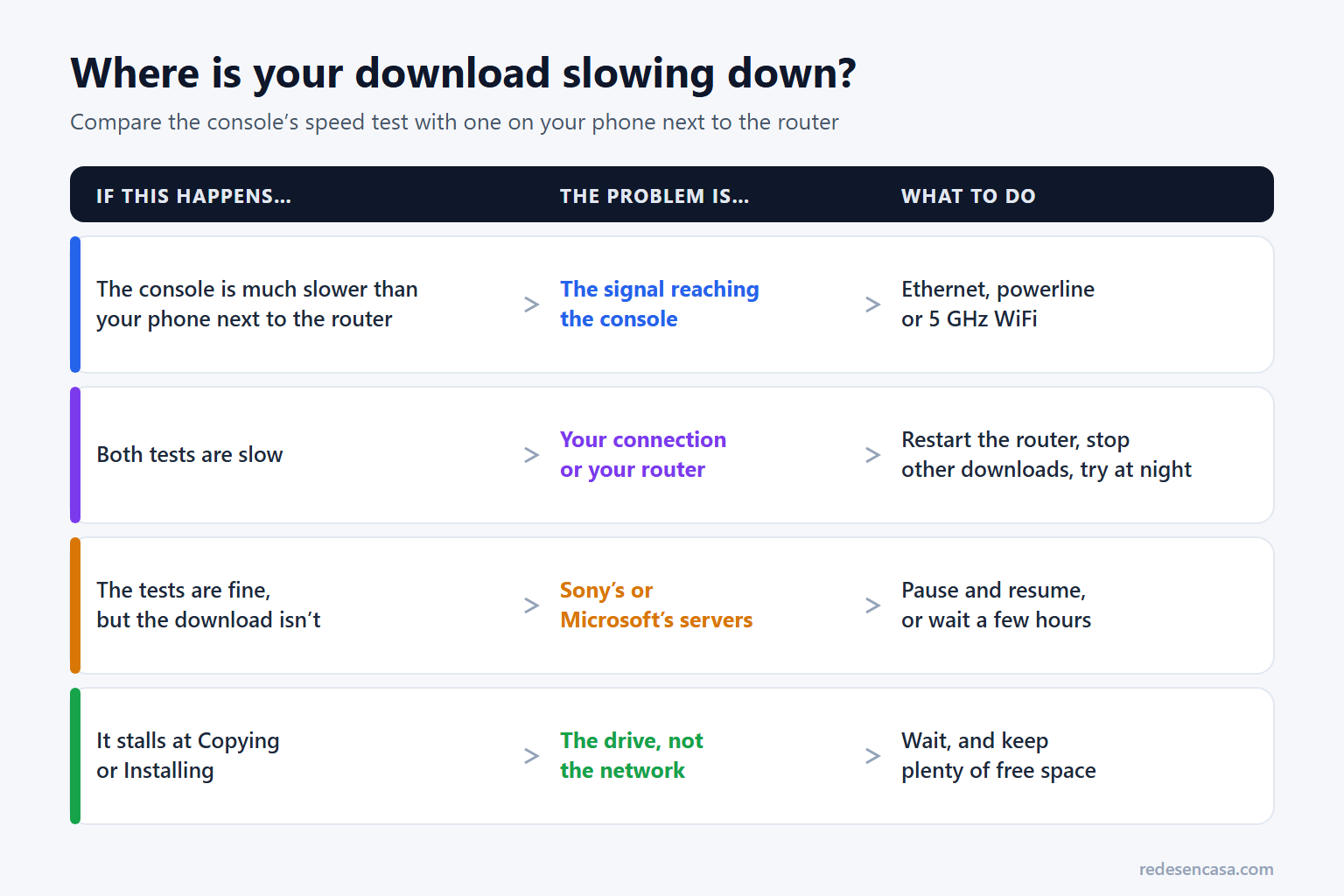
- The console is much slower than your phone next to the router: the problem is the signal reaching the console. Fixes 1 to 3 are for you.
- Both tests are slow: the problem is your connection or your router (other devices using bandwidth, peak hours or a router that hasn’t been restarted in weeks). See fixes 4, 8 and 9.
- Both tests are fine, but the download is slow: it’s almost certainly the PlayStation or Xbox servers. Try fix 6 and, if that doesn’t help, give it a few hours.
- The download finishes but sits on «Copying» or «Installing»: that’s not the network anymore, it’s the console installing the game on its drive. It’s normal for that to take a while.
How to run a speed test on PS5 and Xbox
- PS5: Settings → Network → Connection Status → Test Internet Connection. Look at the download speed.
- Xbox Series X|S: Settings → General → Network settings → Test network speed & statistics.
- Phone next to the router: any test works (Speedtest by Ookla, Fast.com or your provider’s app), as long as the phone is on WiFi and not on cellular data.
Watch the units: some screens and apps show download speed in MB/s (megabytes per second) and speed tests show Mbps (megabits per second). To turn MB/s into Mbps, multiply by 8: a download running at 10 MB/s is going at about 80 Mbps.
10 fixes for a PS5 slow download (and Xbox)
1. Connect the console with an Ethernet cable
It’s the fix that makes the biggest difference for a PS5 slow download, and on Xbox too. Both consoles have a Gigabit Ethernet port, so over a cable they get practically all of your plan’s speed, with no losses to walls or interference. If the console is within 30 to 50 feet of the router, a flat Cat 6 cable hides along the baseboard or slides under a door.
2. If you can’t run a cable, use powerline
A powerline kit carries your internet through the electrical wiring: one adapter next to the router and another next to the console, with a short cable to it. In a typical home it delivers 200 to 400 Mbps of real speed, and above all it’s far more stable than WiFi through two walls. We compare the best models in our guide to the best powerline adapters.
3. On WiFi: use 5 GHz and get the console out of the cabinet
If you’re downloading over WiFi, make sure the console is on the 5 GHz network: 2.4 GHz reaches farther but is much slower. The PS5 has WiFi 6 and the Xbox Series consoles have WiFi 5; with the router in the same room, both download very fast. What steals the most speed is putting the console inside a closed cabinet or behind the TV, with the router at the other end of the house. If your WiFi is weak all over, a mesh WiFi system or a good WiFi extender helps every device.
4. Let it download in rest mode (and overnight)
Both consoles keep downloading with the TV off if you set them up for it:
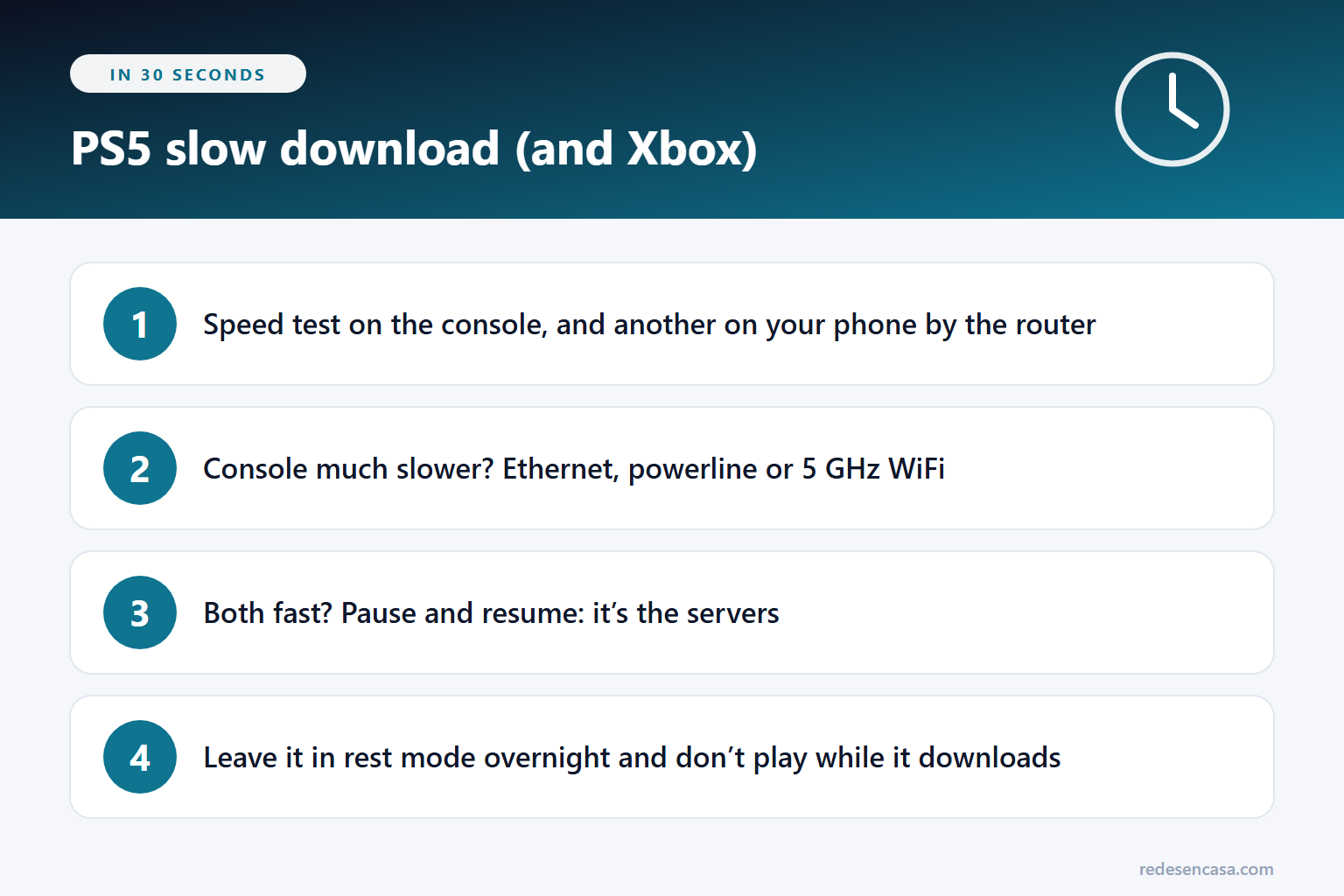
- PS5: Settings → System → Power Saving → Features Available in Rest Mode → turn on Stay Connected to the Internet. Then put the console in rest mode (orange light) instead of turning it off completely.
- Xbox Series: Settings → General → Power options → choose Sleep. Shutdown (energy saving) uses less power, but it’s meant for automatic overnight updates, not for leaving a big download running.
Rest mode doesn’t make your connection faster, but the download gets the whole connection to itself and keeps going while you sleep, when nobody else at home is online.
5. Don’t play or stream while it downloads
Consoles usually give downloads lower priority while a game is open, and online games compete for the same connection. Close the game completely (don’t just leave it in the background) and don’t stream a show in 4K on the same console while it downloads.
6. Pause and resume the download
It’s the oldest trick in the book and it still works. If you have a PS5 slow download stuck at a low speed, pause it and resume it a few seconds later: the console reconnects and sometimes lands on a less busy server. On PS5, do it from the downloads card in the control center (PS button); on Xbox, from the queue in My games & apps.
If that doesn’t help, check for service problems: Sony has a PlayStation Network status page and Microsoft an Xbox status page. On big launch days it’s normal for everything to be slow for a few hours, and there’s nothing you can do about it at home.
7. One download at a time
If you have several downloads queued (the game, its patch and a couple of updates), they split your connection. Keep only the one you need and pause the rest.
8. Pause whatever else is using the internet
A TV streaming in 4K, a video call, a computer backing up photos to the cloud or someone downloading on a PC all take speed away from the console. For a big download, start it when the house is quiet. If you suspect there are more devices than there should be, check how to tell if someone is using your WiFi.
9. Restart the router and the console
If the router hasn’t been turned off in weeks, restart it: unplug it for 30 seconds and plug it back in. Do the same with the console, turning it fully off (not rest mode), and keep its system software up to date.
10. Start the download from your phone
If you buy or pre-order a game away from home, you can send it to download from your phone: with the PlayStation App, if your PS5 is in rest mode and connected to the internet, or with the Xbox app. By the time you get home, it’ll be downloaded or close to it.
What doesn’t work: changing DNS and MTU
Two «tricks» keep showing up in forums and videos, and they almost never change anything:
- Changing DNS (to 1.1.1.1 or 8.8.8.8): DNS only turns names into addresses. It doesn’t make a download faster; at most it changes which server you connect to, and not always to a better one.
- Lowering the MTU to 1473 or 1450: it’s an old tweak that doesn’t speed up downloads on a normal connection. If you changed it and notice drops, set it back to automatic.
If your PS5 slow download is still slow after the ten fixes, the problem is almost certainly the signal reaching the console or the servers, not these settings.
How long should a game take to download?
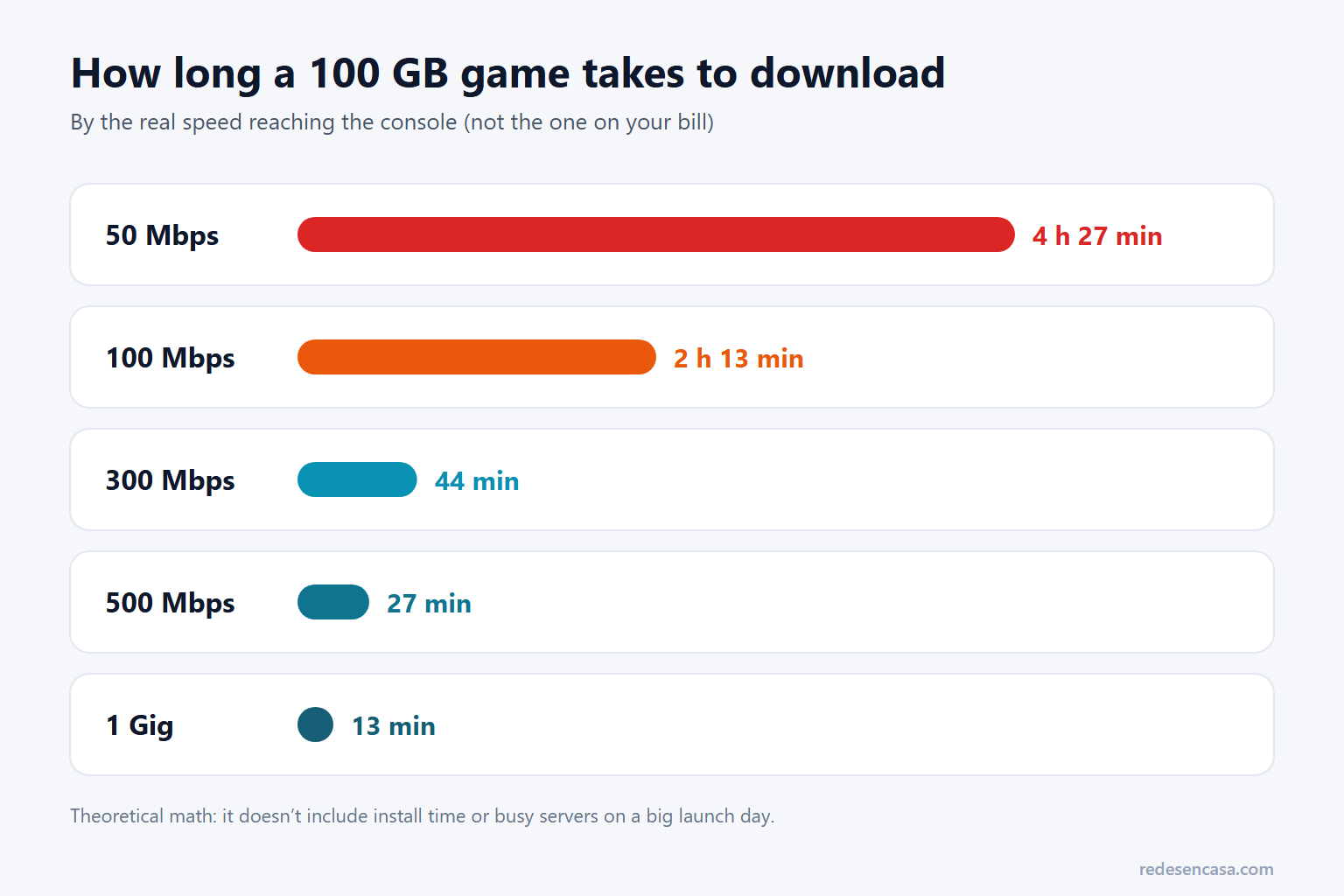
These times use the real speed reaching the console, which can be quite a bit lower than your plan’s if you’re on WiFi:
| Real speed | 50 GB game | 100 GB game | 200 GB game |
|---|---|---|---|
| 50 Mbps | 2 h 13 min | 4 h 27 min | 8 h 53 min |
| 100 Mbps | 1 h 7 min | 2 h 13 min | 4 h 27 min |
| 300 Mbps | 22 min | 44 min | 1 h 29 min |
| 500 Mbps | 13 min | 27 min | 53 min |
| 1 Gig | 7 min | 13 min | 27 min |
Two things the table doesn’t include: servers rarely give a single console all of your bandwidth (especially on launch day), and after the download comes the install, which depends on the drive. If your PS5 slow download takes three times longer than it should, something needs fixing. And if your provider has a monthly data cap, keep in mind that big games and their patches add up fast.
GTA 6: get ready for the November 10 preload
The GTA 6 preload starts on November 10 and the game launches on the 19th. It’ll be one of the biggest downloads of the year, with millions of consoles downloading at once, so everything above counts double. To avoid a PS5 slow download (or an Xbox one) that day:
- Free up at least 212 GB before the 10th: that’s the maximum Rockstar gives.
- Connect the console with Ethernet or powerline that week, even if you go back to WiFi later.
- Start the download as soon as the preload opens and leave it in rest mode overnight; don’t wait until the 19th.
To see how long it’ll take on your connection, try the GTA 6 download time calculator.
If the problem isn’t the download
If what you notice is lag while playing, that’s a different issue (ping, not speed): see how to fix WiFi lag on a console. If you get a strict NAT type, see how to fix a strict NAT type, and if the console won’t connect at all, what to do when your Xbox won’t connect to WiFi.
PS5 slow download FAQ
Why do I have a PS5 slow download on a 500 Mbps plan?
Almost always because the speed gets lost between the router and the console (WiFi through walls, a console inside a cabinet or on the 2.4 GHz band) or because the PlayStation servers are busy. Run a speed test on the console and another on your phone next to the router: if the console is much slower, connect it with Ethernet or powerline.
Does the PS5 download faster in rest mode?
Your connection isn’t any faster, but in rest mode there’s no open game taking priority away from the download, and you can leave it running overnight when nobody else is online. That’s why, in practice, it usually finishes sooner. Turn on Stay Connected to the Internet in Settings → System → Power Saving.
Does changing DNS speed up console downloads?
Almost never. DNS only turns domain names into addresses and doesn’t increase your connection speed. You can try it, but don’t expect a clear improvement.
Why does the download sit on «Copying» for so long?
Because the console has already downloaded the data and is installing it on the drive, a step that doesn’t depend on your internet. It’s normal for big games and patches, and it gets worse when the drive is almost full: keep plenty of free space.
How long does a 100 GB game take to download?
It depends on the real speed reaching the console: about 4 and a half hours at 50 Mbps, a little over 2 hours at 100 Mbps, about 44 minutes at 300 Mbps and about 13 minutes at 1 Gig, not counting the install.
Conclusion
Most of the time, a PS5 slow download (or an Xbox one) gets fixed without changing your plan. Use two speed tests to find out whether the problem is the signal reaching the console, your connection or the servers; connect the console with Ethernet or powerline if you can, and leave big downloads in rest mode overnight. And if it gets stuck, pause and resume.