Best WiFi Extenders 2026: Definitive Guide and Top 7 to Choose the Right One
The best WiFi extenders 2026 have improved a lot compared to previous generations: more power, WiFi 6 at reasonable prices and designs that no longer leave dead zones at home. But buying the one with the highest speed advertised on the box does not guarantee it will work well in your case — the key is choosing based on the size of your home, the type of walls and whether you need to connect devices by cable.
This guide covers the 7 best WiFi extenders 2026 sorted by use case: from the best value-for-money option to improve a specific area to WiFi 6 models for homes with many devices. By the end you will know exactly which one suits you without having to compare technical specs.
Table of Contents
Best WiFi extenders 2026: quick decision (in 20 seconds)
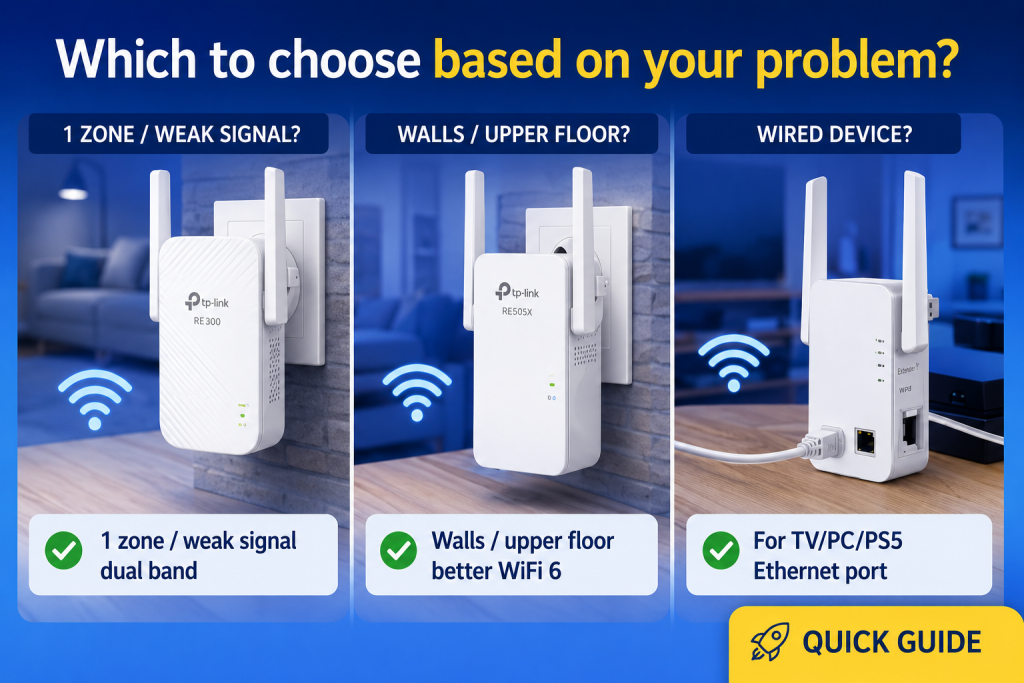
- Just 1 room and decent signal in the hallway: dual-band AC extender (RE550 is the reference for value for money).
- Thick walls, frequent drop-outs or an upper floor: go with WiFi 6 (RE700X or RE500X).
- Want to connect a TV, console or PC by cable: choose one with a Gigabit Ethernet port.
- Multiple rooms or an entire floor: consider a Mesh system instead of an extender.
What to check before buying (checklist)
Before looking at the list of best WiFi extenders 2026, keep these key points in mind so you do not make the wrong choice:
- Dual band (2.4 + 5 GHz) → essential in any current model. Single-band models are obsolete.
- WiFi 6 (AX) if you have many devices connected simultaneously or want better real-world performance long term.
- «Realistic» speed: the advertised numbers (AC1750, AX3000) are the sum of both bands under ideal conditions. In real use, expect 40–60% of that.
- External antennas: in homes with thick walls, models with external antennas and beamforming penetrate better.
- AP mode (access point): if you ever run a cable to the extender, AP mode gives a much more stable connection than repeater mode.
- Gigabit Ethernet port: needed if you want to connect a TV, console or PC by cable from the extender.
Where to place it so it actually works (the rule that matters most)
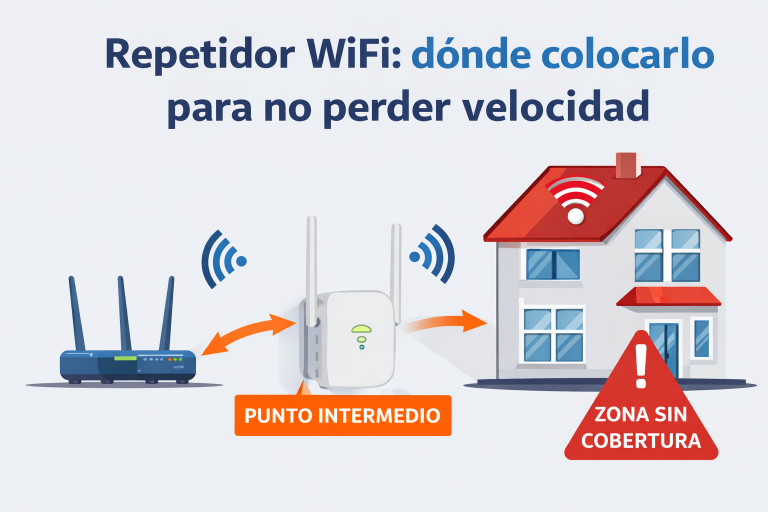
Before reviewing the best WiFi extenders 2026, there is one rule that makes the difference between it working well or poorly: the extender must receive a good signal in order to give a good signal.
Always place it halfway between the router and the area with poor coverage, where you still have 2–3 stable signal bars. If you plug it directly into the room where the signal has already disappeared, it will only repeat a bad signal — and no model fixes that, no matter how expensive it is.
📌 Detailed guide on where to place your extender without losing speed: https://redesencasa.com/donde-colocar-un-repetidor-wifi-para-no-perder-velocidad/
Top 7 best WiFi extenders 2026
1) TP-Link RE550 (AC1900) — best value for money
The RE550 is the reference extender in 2026 for anyone looking to improve a specific area without spending more than necessary. AC1900 with 3 external antennas, Gigabit Ethernet port and dual band 2.4+5 GHz. The build quality is solid, setup is straightforward via the Tether app and the 5 GHz signal is noticeably better than single-band models still sold at similar prices.
✅ For: improving a specific area without complications and on a tight budget.
🔗 See TP-Link RE550 price on Amazon
2) TP-Link RE650 (AC2600) — more power for thick walls
If the RE550 falls short because of concrete walls or because the area to cover is further away, the RE650 is a clear step up. AC2600, 4 external antennas with MU-MIMO and advertised coverage of up to 2,150 sq ft. In homes with a complicated layout, the difference versus the RE550 is especially noticeable on the 5 GHz band at medium distances.
✅ For: harder walls, distant rooms or medium-sized homes without wanting to move to WiFi 6.
🔗 See TP-Link RE650 price on Amazon
3) TP-Link RE700X (AX3000, WiFi 6) — the best WiFi 6 extender
If you are looking for the best WiFi extenders 2026 with WiFi 6, the RE700X is the reference model. AX3000, OFDMA technology for handling multiple devices simultaneously without noticeable interference, and high-performance antennas. The main difference compared to AC models is not peak speed but stability when 5+ devices are connected at the same time.
✅ For: homes with several devices, 300 Mbps+ fiber, or anyone who wants an extender that stays relevant for years to come.
🔗 See TP-Link RE700X price on Amazon
4) TP-Link RE500X (AX1500, WiFi 6) — balanced WiFi 6
The RE500X is the ideal middle ground between AC models and the RE700X. WiFi 6 with AX1500, dual band and compact plug-in design. For most normal-sized apartments, this speed is more than enough — no home service actually needs more than 400 Mbps over WiFi. The price is significantly lower than the RE700X in return.
✅ For: improving coverage with WiFi 6 without paying RE700X prices. The most balanced option on the list.
🔗 See TP-Link RE500X price on Amazon
5) TP-Link RE700X (AX3000, WiFi 6) — the step up to AX3000 with a Gigabit port
The RE700X is a clear step above the RE500X: AX3000 instead of AX1500, two external antennas and a Gigabit Ethernet port, plus EasyMesh support so your phone switches nodes without dropping the connection. It is the one that makes sense if your connection is above 600 Mbps, or if you plan to wire a TV or a console to the extender, because an AX1500 unit with a 100 Mbps port becomes the bottleneck there.
✅ For: large homes, connections of 600 Mbps or more, and anyone who wants to wire a device in the extended room.
🔗 See TP-Link RE700X price on Amazon
6) Cudy AX1800 (WiFi 6) — budget option with solid performance
If your budget is tight but you still want WiFi 6, Cudy has earned its place among the best WiFi extenders 2026 thanks to its value for money. AX1800, dual band, easy setup and solid real-world performance for normal home use. It does not have the antennas or range of the RE700X, but at its price it is hard to find anything better in WiFi 6.
✅ For: tight budget that still wants WiFi 6 without overpaying.
🔗 See Cudy AX1800 price on Amazon
7) NETGEAR (WiFi 6 / AX) — alternative if you do not want TP-Link
NETGEAR is the most solid alternative to TP-Link for anyone who prefers a different brand for support, warranty, or simply because they already have other NETGEAR devices at home. Their WiFi 6 AX models are well built and have a good reputation in home networking forums. The price tends to be slightly higher than the equivalent TP-Link, but the quality justifies the difference for anyone who values after-sales support.
✅ For: anyone who prefers alternatives to TP-Link or already has other NETGEAR devices.
🔗 See NETGEAR WiFi 6 extenders on Amazon
Quick comparison table
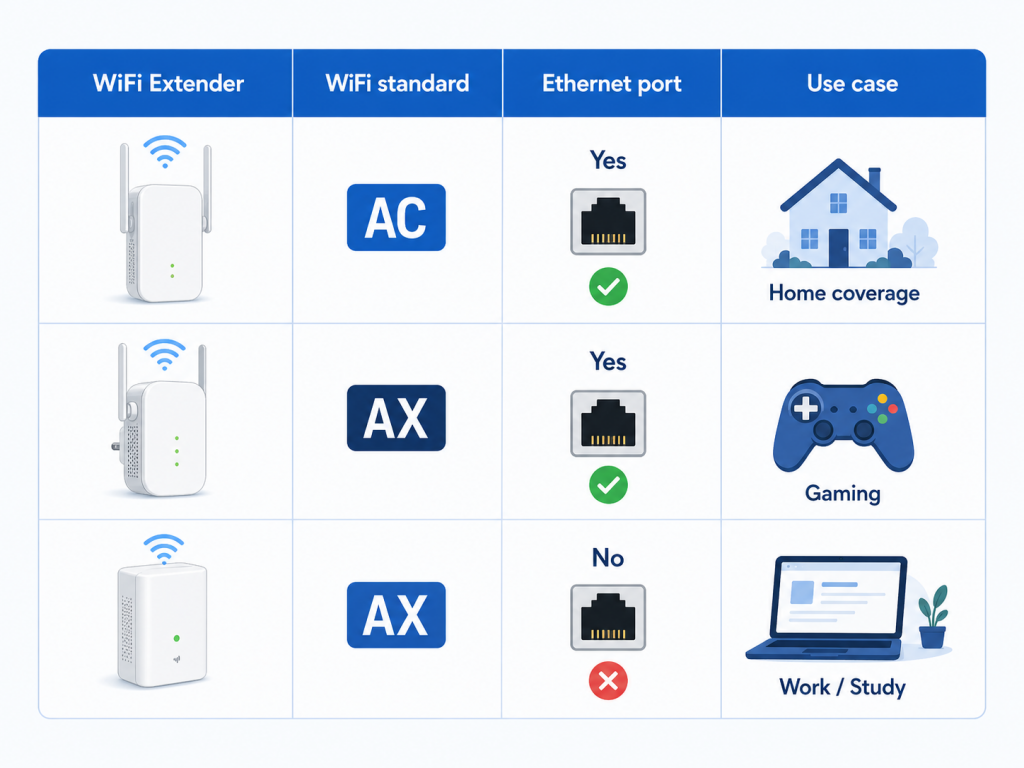
| Model | Standard | Ethernet | Best for |
|---|---|---|---|
| TP-Link RE550 | AC1900 | ✅ Gigabit | Best value for money |
| TP-Link RE650 | AC2600 | ✅ Gigabit | Thick walls, more range |
| TP-Link RE700X | AX3000 WiFi 6 | ✅ Gigabit | Best WiFi 6 on the list |
| TP-Link RE500X | AX1500 WiFi 6 | ✅ | Balanced WiFi 6 |
| TP-Link RE700X | AX3000 WiFi 6 | ✅ | AX3000 + Gigabit port |
| Cudy AX1800 | AX1800 WiFi 6 | ✅ | Budget WiFi 6 |
| NETGEAR AX | WiFi 6 | ✅ | TP-Link alternative |
Frequently asked questions
Does a WiFi extender always improve the signal?
Only if it receives a good signal. If it receives a bad signal, it repeats a bad signal. Placement matters more than the model you buy. Always place it halfway between the router and the problem area.
2.4 GHz or 5 GHz for the extender?
5 GHz is faster and has less interference, but does not penetrate walls as well. 2.4 GHz reaches further but tends to be more congested in apartment buildings. The best WiFi extenders 2026 are all dual band — connect demanding devices to 5 GHz and those farther away to 2.4 GHz.
When should I skip the extender and go with Mesh?
If multiple rooms or an entire floor are failing, a Mesh system is almost always a better investment than stacking extenders. A Mesh provides a unified network with better roaming management between nodes.
Is a WiFi 6 extender worth it if my router is WiFi 5?
Yes, because the extender connects to your router via its backhaul band (WiFi 5 is compatible) and offers WiFi 6 to devices that support it. You pay a bit more but the extender stays relevant for more years without becoming obsolete.
Extender with Ethernet port or without?
If you have or might have a TV, console or PC near the extender, always choose one with an Ethernet port. Connecting by cable from the extender eliminates the additional WiFi latency for those devices.
Do the best WiFi extenders 2026 change price often?
TP-Link and Cudy models have frequent price swings on Amazon. The RE550 typically costs $25–40, the RE700X $50–70. It is worth checking the price history before buying — prices often drop $10–15 within a few weeks.
Alternatives if an extender is not the right fit (based on your case)
- 2 floors or multiple rooms → WiFi Mesh (2–3 nodes). 📌 WiFi Mesh guide for 2-story homes
- TV, PC or console wired for more stability → Powerline (PLC) if your electrical installation supports it. 📌 Best Powerline adapter for home
- Just want to connect a TV or console by cable from the extender → extender with Ethernet port.
- Before buying anything: try free tricks to improve your signal.
Conclusion
If you are looking for the best WiFi extenders 2026, the right choice depends on your specific situation. Final summary:
- ✅ Best value for money: TP-Link RE550 — solid, Gigabit Ethernet, enough for most cases.
- ✅ Best WiFi 6: TP-Link RE700X — the most complete option for long-term performance.
- ✅ Budget WiFi 6: TP-Link RE500X or Cudy AX1800 — solid middle ground between price and current technology.
- 🔵 If the problem affects multiple areas: consider a Mesh system before stacking extenders.