Security Camera Keeps Disconnecting from WiFi: Causes and Fixes (2026)
If your security camera keeps disconnecting from WiFi, the camera itself is rarely the problem. In most cases it’s the signal that reaches it, the band it’s connected to, or an IP address that changes at the worst moment. And it’s especially frustrating, because a camera that goes offline stops doing the one job you bought it for.
Below you’ll see why it happens and how to fix it step by step, for indoor and outdoor cameras and video doorbells, whatever the brand: Ring, Blink, Wyze, Arlo, eufy, Tapo or any other.
Tabla de Contenidos

Why your security camera keeps disconnecting from WiFi
Start by finding the line that best describes what you’re seeing:
- It drops now and then and comes back on its own: the signal where it’s mounted is borderline. This is the number one cause.
- It shows «offline» after a power outage or a router restart: it doesn’t get its address back properly and needs a fixed IP.
- It stopped working after you changed your router or internet provider: it’s still looking for the old network, or the new router puts it on 5 GHz.
- It only fails in the evening: the 2.4 GHz band is busiest at that time, in your home and in your neighbors’.
- It started after an update: buggy firmware, usually fixed in the next version.
- The outdoor camera fails more than the indoor ones: the exterior wall absorbs a lot of signal. It’s almost certainly a coverage problem.
- It’s a battery camera and it drops more in winter: a low battery, made worse by the cold, can make it disconnect or miss events.
Step 1: Check the signal where the camera is
Before changing anything, find out how much signal actually reaches the camera. The quickest test: stand next to the camera with your phone and look at the WiFi bars. If you only get one or two, you already know why your security camera keeps disconnecting from WiFi.

Most camera apps also show the signal the camera itself receives, usually in the device’s info or health section. Ring’s app, for example, shows it as an RSSI number under Device Health, and other brands show bars or a percentage. As a rule of thumb, below 50 to 60% (or worse than about -70 dBm) intermittent drops are almost guaranteed. If that’s your case, skip to the coverage section below.
Step 2: Connect it to the 2.4 GHz band
Most home security cameras only work on the 2.4 GHz band, and the ones that also support 5 GHz usually do better on 2.4 GHz when they’re far from the router, because that band goes through walls much better.
- Open your router’s settings (usually 192.168.0.1, 192.168.1.1 or 10.0.0.1) or its app.
- If both bands share one network name, give each its own name, for example HomeWiFi and HomeWiFi-5G.
- Set up the camera again from its app and connect it to the 2.4 GHz network.
This step fixes about half of the cameras that won’t reconnect after a router change: the new router merges both bands under one name, and the camera can’t latch on to the 2.4 GHz side. If you use a mesh system that doesn’t let you split the bands, check its app for an option to pause 5 GHz while you set up the camera.
Step 3: If you changed your router, reuse the old network name
When your security camera keeps disconnecting from WiFi right after you got a new router or switched internet providers, it’s still looking for the old network. You can set every camera up again, or use a shortcut that saves a lot of time: give the new router exactly the same network name and password as the old one. Cameras, smart plugs and speakers then reconnect on their own.
Check the security mode too. If the new router uses WPA3 only, older cameras that only speak WPA2 won’t be able to join. Choosing the mixed WPA2/WPA3 mode fixes it; we explain the difference in WPA2 vs WPA3.
Step 4: Give the camera a fixed IP from the router
If your security camera keeps disconnecting from WiFi after every power outage or router restart, the problem is usually that the router gives it a different IP address each time and the camera is slow to recover, or doesn’t. The fix is to reserve a fixed IP for it:
- Open the router’s settings and look for DHCP, «Address Reservation» or the list of connected devices.
- Find the camera in the list. It usually appears with the brand’s name or part of its model.
- Use the option to reserve that IP (sometimes called a static lease) so the camera always gets the address it has now.
- Restart the camera so it picks up the reservation.
Step 5: Update the camera’s firmware
If your security camera keeps disconnecting from WiFi since an update, or for no clear reason, check the firmware. Manufacturers fix WiFi stability problems all the time. Open the camera’s app, go to the device settings and look for a firmware update. If there’s one pending, install it with the camera close to the router if you can: an update cut off by a weak signal can leave the camera stuck.
While you’re there, restart the camera from the app once it’s updated. Many models build up memory glitches after weeks running non-stop, and a restart clears them.
Step 6: Check how many devices are crowding your network
If your security camera keeps disconnecting from WiFi mostly in the evening, look at the rest of your network. Cameras stream video constantly, and if your 2.4 GHz band is already full of devices (smart plugs, bulbs, speakers, the printer…), the camera is one of the first to suffer. Open your router’s app or settings and count how many devices are connected. If there are a lot, move the ones that support 5 GHz to that band to free up 2.4 GHz.
Battery cameras deserve a special mention. To save power they sleep most of the time and wake up when they detect motion, so a weak or busy network makes them slow to connect and they can miss the start of a clip. Keep their batteries charged, especially in cold weather, and for Blink, keep the Sync Module reasonably close to the cameras.
If the signal doesn’t reach the camera well
Cameras go where they’re needed (the front door, the garage, the nursery, the backyard), not where the WiFi is strong. If your security camera keeps disconnecting from WiFi and Step 1 showed a borderline signal, the only real fix is to bring the network closer to the camera.
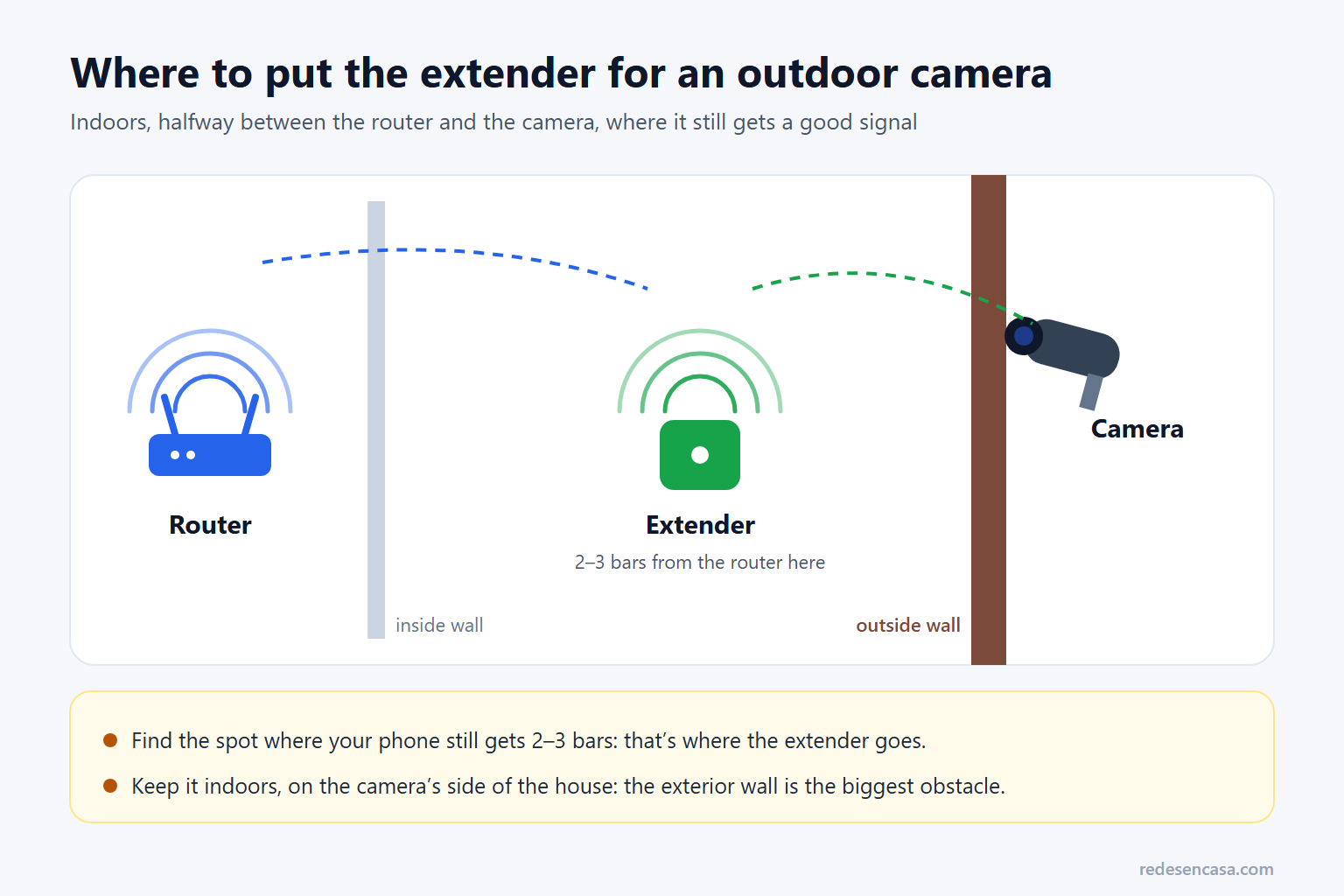
A WiFi extender placed halfway between the router and the camera fixes it in most cases. The TP-Link RE700X is our usual pick: dual-band WiFi 6, stable and very easy to set up. Put it indoors, where your phone still gets two or three bars, on the side of the house where the camera is.
If you have several cameras around the house, or the dead spots are spread out, a mesh system covers everything with one network instead of patching one corner. We compare options in the best WiFi mesh systems, and more extenders in our list of the best WiFi extenders. For a detached garage or a far room, a powerline kit with WiFi can carry the connection through the electrical wiring; see the best powerline adapters.
If you use Ring cameras, the Ring Chime Pro also works as a WiFi extender for Ring devices, which can be enough for a doorbell or a camera just out of range.
When it’s time to replace the camera
If the camera that keeps failing is several years old, or from a brand that no longer releases updates, replacing it is cheap and gets rid of firmware problems at the root. A camera that no longer gets security updates is also a risk on your network, as we explain in how to secure your home network.
Quick table: causes and fixes
| Symptom | Likely cause | Fix |
|---|---|---|
| Drops now and then and comes back | Borderline signal where the camera is | Extender halfway (Step 1 and coverage) |
| «Offline» after power outages | Its IP changes and it doesn’t recover | Step 4: fixed IP from the router |
| Won’t connect after a router change | Old network name, merged bands or WPA3 | Steps 2 and 3 |
| Only fails in the evening | 2.4 GHz busiest at peak time | Move devices to 5 GHz, change channel |
| Fails since an update | Buggy firmware | Step 5: update and restart |
| The outdoor one fails more | The exterior wall blocks the signal | Extender on the camera’s side of the house |
| Battery camera misses events | Low battery or slow to wake on a weak signal | Charge it, improve the signal |
Security camera keeps disconnecting from WiFi: FAQ
Why does my security camera keep disconnecting from WiFi?
The most common cause is a weak signal where the camera is mounted, followed by band problems (most cameras need 2.4 GHz) and an IP address that changes after restarts. Check the signal next to the camera first: below 50 to 60%, drops are almost certain.
Do security cameras work on 5 GHz?
Most home cameras only support 2.4 GHz. Some newer models also support 5 GHz, but even then 2.4 GHz is usually the better choice for cameras far from the router, because it goes through walls and floors much better.
Why doesn’t my camera reconnect after a power outage?
When the power comes back, the router may give it a different IP address, and many cameras don’t handle that well. Reserving a fixed IP for it in the router’s DHCP settings means it always gets the same address and reconnects on its own.
Why does my outdoor camera disconnect more than the indoor ones?
Because an exterior wall is one of the obstacles that absorbs the most signal in a home. An outdoor camera can be a few feet from the router in a straight line and still get half the signal of an indoor one. An extender indoors, on that side of the house, usually fixes it.
How much WiFi signal does a security camera need?
For smooth 1080p or 2K video, aim for at least 60 to 70% signal (about -60 dBm or better) where the camera is installed. With less, live view takes a while to load and intermittent drops are common.
Is it worth replacing an old WiFi camera?
If it’s more than four or five years old, or the maker no longer releases updates, yes. Current cameras handle reconnections much better, and a camera without security updates is also a risk. Models like the Tapo C200 are inexpensive and very stable.
Conclusion
When a security camera keeps disconnecting from WiFi, the right order is: check the signal where it’s mounted, make sure it’s on the 2.4 GHz band, reserve a fixed IP for it and update the firmware. If you changed routers, reusing the old network name and password saves you from setting everything up again. Those steps fix the vast majority of cases.
And if the signal was the problem, which with cameras it almost always is, don’t overthink it: a well-placed extender between the router and the camera is the real fix, and far cheaper than running cables through the house.